
Why the 20% Budget Scaling Rule Exists — And Why Most Advertisers Ignore It
Every Meta advertiser eventually hits the same wall: a campaign is profitable at $100/day, so the logical move is to scale. You jump to $300/day overnight, and within 48 hours your CPA doubles. ROAS craters. The ad set enters learning phase again. You panic, slash the budget, and the campaign never recovers.
This isn’t bad luck. It’s physics. Meta’s delivery algorithm is a machine learning system that optimizes around a stable set of signals. When you shock it with a sudden budget increase, you force it to re-explore audiences at a pace it can’t handle efficiently. The result: wasted impressions, broader (lower-intent) reach, and inflated costs.
The 20% rule is the antidote. It says: never increase your daily budget by more than 20% every 48–72 hours. This keeps the algorithm in its optimization window, avoids a learning phase reset, and lets your cost structure scale proportionally with spend.
But here’s the part nobody talks about: even if you nail the 20% rule on the ad side, your post-click funnel has its own scaling limits — and most advertisers never test them until it’s too late.
The 20% Scaling Ladder: A Real-Dollar Example
Let’s walk through a concrete scaling sequence starting from a $100/day ad set that’s producing a $28 CPA with a target of $35:
| Day | Daily Budget | Increase | Expected CPA | Daily Conversions (est.) |
|---|---|---|---|---|
| 1–3 | $100 | Baseline | $28 | 3.6 |
| 4–6 | $120 | +20% | $28–$30 | 4.0–4.3 |
| 7–9 | $145 | +20% | $29–$31 | 4.7–5.0 |
| 10–12 | $175 | +20% | $30–$33 | 5.3–5.8 |
| 13–15 | $210 | +20% | $31–$34 | 6.2–6.8 |
| 16–18 | $250 | +19% | $32–$35 | 7.1–7.8 |
In 18 days, you’ve 2.5x’d your budget while keeping CPA within your $35 ceiling. Compare this to a single jump from $100 to $250: Meta’s system would likely push CPA to $45–$55 during the re-learning window, burning $300–$500 in wasted spend before stabilizing — if it stabilizes at all.
Why Aggressive Scaling Breaks CPA: The Algorithm’s Perspective
Meta’s ad delivery works on an auction-based system with predictive modeling. At $100/day, the algorithm has identified a narrow pocket of users it can reach profitably within your bid constraints. When you double the budget overnight, you’re asking the system to find twice as many of those users — immediately.
Those users don’t exist at the same cost. Here’s what happens mechanically:
- Audience expansion: Meta widens the targeting net to fill the new budget, reaching users with lower predicted conversion rates.
- Auction pressure: Higher daily spend means bidding on more auctions per hour, including less favorable ones the algorithm previously skipped.
- Signal dilution: With more impressions going to lower-intent users, the conversion signal weakens. The model’s predictions become noisier.
- Learning phase reset: If the budget change exceeds Meta’s internal threshold (roughly 20–30% in most accounts), the ad set enters learning phase, requiring ~50 new conversions to re-stabilize.
A learning phase reset at a higher budget is especially dangerous. You’re now spending $250/day while the algorithm is essentially guessing. At a $28 CPA, you need about 9 conversions per day to exit learning. But during learning, CPA often inflates 30–50%, meaning you’re paying $36–$42 per conversion — and it may take 5–7 days to accumulate 50 conversions at those rates. That’s $1,250–$1,750 in above-target spend just to get back to where you started.
The Learning Phase Reset Trap
The learning phase isn’t just a UI label — it represents a real degradation in delivery efficiency. During learning phase:
- CPMs are 15–30% higher than optimized delivery
- Click-through rates drop as Meta tests broader placements
- Conversion modeling relies on interpolation rather than observed patterns
- The system is more sensitive to external volatility (competitor bids, time-of-day patterns)
The trap: advertisers see poor performance during learning, reduce the budget in panic, and trigger another learning phase reset. This creates a death spiral where the ad set never accumulates enough data to optimize, and the advertiser concludes “scaling doesn’t work.”
Rule of thumb: once you commit to a budget increase, leave it for a minimum of 72 hours. If CPA is above target but trending down, hold. Only cut if CPA is 2x+ your target after 72 hours with no downward trend.
The 60/40 Budget Split: Top-of-Funnel vs. Bottom-of-Funnel
Most advertisers scale by pouring more money into bottom-of-funnel (BOF) campaigns — retargeting, dynamic product ads, high-intent lookalikes. This feels safe because BOF typically has the lowest CPA. But BOF audiences are finite. When you scale BOF spend beyond audience capacity, you get frequency fatigue and diminishing returns.
A more sustainable approach is the 60/40 split:
- 60% of incremental budget goes to top-of-funnel and mid-funnel: prospecting campaigns, broad targeting, value-based lookalikes (1–5%), video view campaigns that feed retargeting pools.
- 40% of incremental budget goes to bottom-of-funnel: retargeting, high-intent lookalikes (1–2%), cart abandonment, and re-engagement.
Here’s the math at a $250/day budget:
- TOF/MOF: $150/day — feeds the pipeline, expands the retargeting pool, builds brand recognition
- BOF: $100/day — converts warm audiences efficiently without oversaturating
When you scale from $250 to $300 (the next 20% step), add $30 to TOF/MOF and $20 to BOF. This maintains the ratio and ensures your retargeting audiences grow in proportion to your BOF spend.
Advertisers who dump 80%+ into BOF will see CPAs spike at scale because they’re showing the same ads to the same people 8–12 times per week. Frequency above 5x on retargeting is almost always a signal of audience exhaustion.
Post-Click Funnel Capacity: The Bottleneck Nobody Measures
Here’s the uncomfortable truth: your landing page has a throughput limit. Not a theoretical one — a real, measurable capacity ceiling where performance degrades under load.
At $100/day with a $1.50 CPC, you’re sending ~67 visitors per day to your landing page. At $250/day, that’s ~167 visitors. At $500/day, ~333. The question isn’t whether your server can handle 333 visitors — it’s whether the experience holds up.
Post-click funnel capacity degrades in three ways:
1. Server Response Time Under Load
Most landing pages are hosted on shared infrastructure (Shopify, WordPress on shared hosting, Webflow). At low traffic, page load times sit around 1.5–2.5 seconds. But as concurrent sessions increase, several things happen:
- Database queries queue up (especially with dynamic content, personalization, or inventory checks)
- Third-party scripts (analytics, chat widgets, retargeting pixels) compete for browser resources
- CDN cache hit rates drop if you’re serving personalized or geo-targeted content
- Time-to-interactive (TTI) creeps from 2.5s to 4–6s
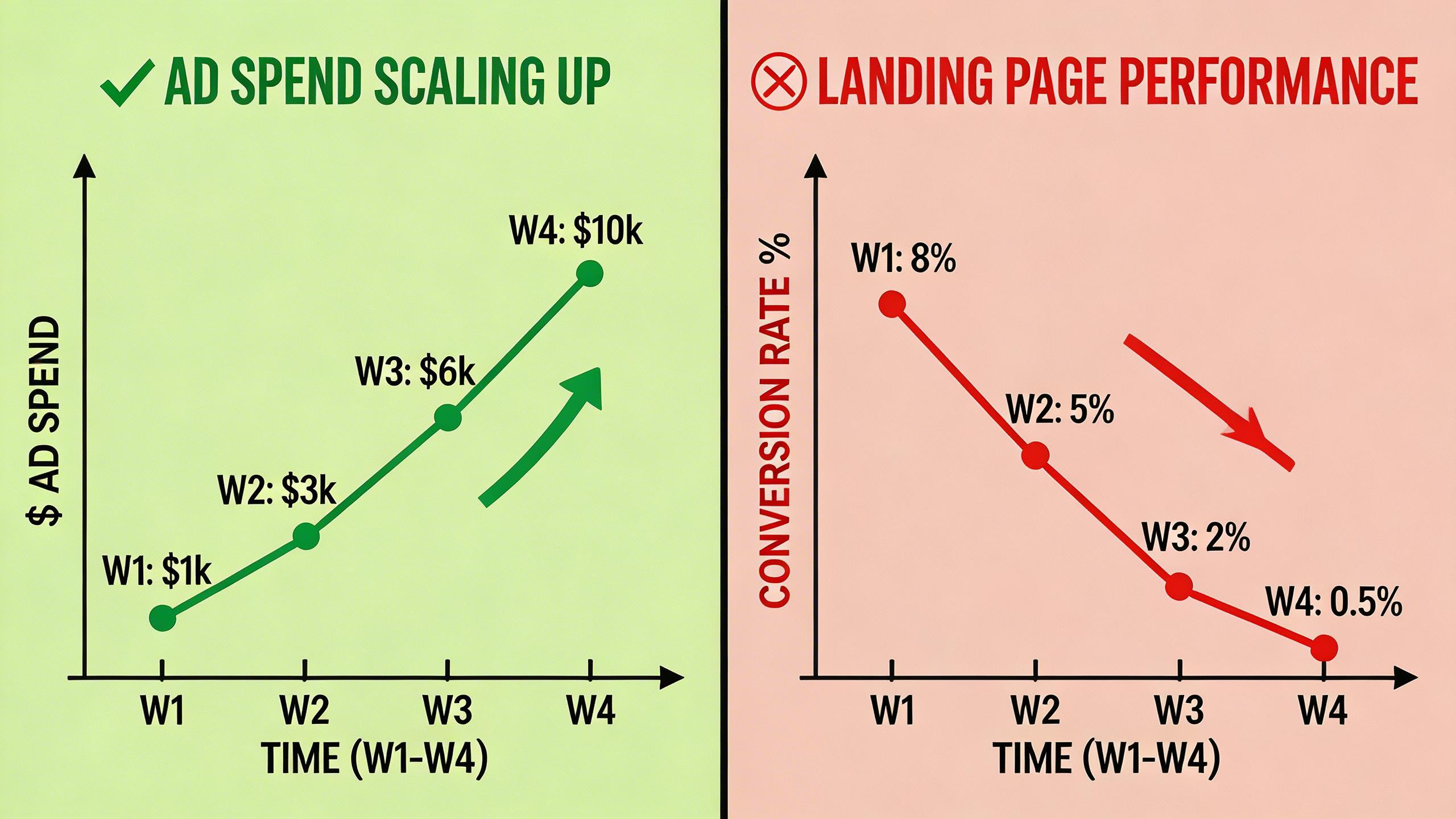
Google’s data shows that every additional second of load time between 1–5 seconds increases bounce probability by 32%. If your page goes from 2s to 4s under scaled traffic, you could lose 30%+ of your paid clicks before they even see your offer.
2. Form and Checkout Bottlenecks
Lead gen forms backed by CRMs often have API rate limits. If you’re sending form submissions to HubSpot, Salesforce, or a custom endpoint, verify the rate limits. A form that works perfectly with 5 submissions per hour may timeout or throw errors at 25 submissions per hour. Each failed submission is a lost conversion you already paid for.
E-commerce checkouts face similar issues: payment gateway timeouts, inventory sync delays, and session management problems under concurrent load.
3. UX Degradation at Scale
This is subtler. When you scale ad spend, you’re reaching users with lower intent and less familiarity with your brand. Your landing page that converts at 8% with warm, targeted traffic may convert at 3% with the broader audience that comes with a 2.5x budget increase. This isn’t a technical problem — it’s a messaging mismatch.
The page was optimized for high-intent users. The new traffic needs more education, more social proof, and a different value proposition hierarchy. If you don’t adapt the page for the scaled audience, your CVR drops even if the page loads perfectly.
How to Stress-Test Your Post-Click Flow
Before you scale ad spend, validate that your post-click infrastructure can handle the load. Here’s a practical testing protocol:
Step 1: Establish Baseline Metrics
Record these at your current traffic level:
- Page load time (use Google PageSpeed Insights, target < 2.5s on mobile)
- Time to interactive (TTI)
- Server response time (TTFB — Time to First Byte, target < 600ms)
- Form submission success rate
- Landing page CVR by traffic source
Step 2: Simulate Scaled Traffic
Use a load testing tool (k6, Locust, or even Google Lighthouse with throttling). Simulate 3x your current peak concurrent visitors for at least 10 minutes. Monitor:
- Does TTFB exceed 1 second?
- Do any third-party scripts fail to load?
- Does form submission latency increase beyond 3 seconds?
- Do you get any 5xx errors?
Step 3: Test the Full Conversion Path
Don’t just test the landing page — test the entire post-click sequence:
- Landing page → form/cart → thank you/confirmation page
- Email trigger delivery time (should fire within 60 seconds)
- CRM/pixel fire reliability (verify events are logged for every conversion)
- Retargeting pixel accuracy under load
Step 4: Identify Your Breaking Point
The goal isn’t to prove your page works at current load — it’s to find where it breaks. If your page degrades at 200 concurrent sessions and your scaled budget would drive 180, you have almost no headroom. You need either infrastructure upgrades or a lower scaling target.
Aligning Creative Scaling with Funnel Scaling: The Synchronized Approach
The 20% rule isn’t just about budget — it’s a framework for synchronized scaling across your entire acquisition system. Here’s how to align each component:
Week 1–2: Foundation ($100→$145/day)
- Budget: Two 20% increases, 72 hours apart
- Creative: Run 3–4 ad variations. Identify top 2 performers by CTR and CVR.
- Funnel: Run baseline load test. Fix any issues with TTFB > 800ms or mobile load time > 3s.
- Tracking: Verify CAPI (Conversions API) event match quality is above 6.0.
Week 3–4: Growth ($145→$210/day)
- Budget: Two more 20% increases
- Creative: Introduce 2 new variations based on top performer angles. Pause underperformers.
- Funnel: Create a second landing page variant optimized for the broader audience. A/B test against original.
- Tracking: Monitor CVR daily. If CVR drops more than 15% from baseline, investigate before the next budget increase.
Week 5–6: Scale ($210→$300/day)
- Budget: Two more 20% increases
- Creative: Expand to 5–6 active variations. Test new formats (Reels, carousel) if not already running.
- Funnel: Deploy the winning landing page variant. Upgrade hosting if load tests show degradation above 250 concurrent sessions.
- Tracking: Implement server-side conversion tracking as a backup to browser-side pixels, which become less reliable at scale.
The Compound Effect: What Happens When You Get This Right
Advertisers who follow synchronized scaling — 20% budget increments paired with funnel capacity upgrades — see a fundamentally different growth curve:
- CPA stability: CPA stays within 10–15% of baseline even at 3x budget, compared to 40–60% CPA inflation with aggressive scaling.
- Higher ROAS at scale: Because the funnel converts efficiently at every traffic level, revenue grows proportionally with spend.
- Reduced waste: No learning phase resets means no wasted “re-learning” spend. Over a 6-week scaling period, this saves $2,000–$5,000 on a mid-five-figure monthly budget.
- Compounding data: Stable campaigns accumulate cleaner conversion data, which improves Meta’s predictive model. Better predictions → better targeting → lower CPA. It’s a virtuous cycle.
The advertisers who scale from $3,000/month to $15,000/month profitably aren’t doing anything exotic. They’re doing this: 20% increments, 72-hour holds, 60/40 funnel splits, and stress-tested post-click infrastructure. It’s not glamorous. It works.
Common Mistakes That Derail Budget Scaling
Even with the 20% rule, advertisers sabotage their scaling efforts through these errors:
- Scaling during volatile periods: Avoid increasing budgets during major shopping events (Black Friday, Prime Day) or right after iOS privacy updates. Auction dynamics are unstable, and your 20% increase gets lost in the noise.
- Ignoring frequency metrics: If your retargeting frequency exceeds 5x per 7-day window, you’ve saturated your BOF audience. Scale TOF first to refill the pool.
- Not refreshing creative: Ad fatigue hits faster at higher budgets because you’re reaching users more often. Plan to refresh 30–50% of your creative library every 2–3 weeks during active scaling.
- Single landing page dependency: Running all scaled traffic to one page means one broken element kills your entire funnel. Always have a backup page ready.
- Neglecting mobile performance: 78% of Meta ad clicks happen on mobile (2026 benchmark). If your mobile page load time exceeds 3 seconds, fix that before spending another dollar on ads.
Your Scaling Checklist Before Every Budget Increase
Before each 20% bump, verify these five conditions:
- ✅ CPA is at or below target for the previous 72 hours
- ✅ The ad set is out of learning phase (active status, not “Learning” or “Learning Limited”)
- ✅ Landing page load time is under 2.5 seconds on mobile at current traffic levels
- ✅ CVR has not dropped more than 10% from baseline since the last budget increase
- ✅ Retargeting frequency is below 5x per 7-day window
If any condition fails, fix it before scaling. The 20% rule only works when the entire system is healthy. Budget is just one input — your post-click funnel, creative rotation, and audience health are equally important.
The advertisers who master this don’t just scale their budgets. They scale their businesses.
Stop losing conversions after the click.
DeepClick helps Meta advertisers fix post-click drop-offs and improve CVR by 30%+ through automated re-engagement and post-click link optimization.

Leave a Reply